> ## Documentation Index
> Fetch the complete documentation index at: https://docs.getunblocked.com/llms.txt
> Use this file to discover all available pages before exploring further.
# Bitbucket
> Connect your Bitbucket workspace to Unblocked so it can index repositories and pull requests, keep them in sync, and cite PR discussions in its answers.
Running your own Bitbucket Data Center self-managed solution? Go take a look
at the [Bitbucket Data Center
documentation](/data-sources/bitbucket-data-center) instead. If you are using
Bitbucket.org, this is how you can get started.
Connecting your Bitbucket workspace gives Unblocked access to your repositories and pull requests. Unblocked uses this data to answer questions about your code, explain why changes were made, and surface relevant PR discussions. Pull requests and their discussions appear as cited sources in Unblocked's answers.
## Data sync
Pull requests are synchronized in real time, so they are always up to date. [Code Review](/code-review) always works with the current state of your pull request.
Unblocked indexes source code from your repository's default branch at least once every 8 hours. Answers and search — including through [Unblocked MCP](/unblocked-mcp/mcp-overview) — use this index, so changes on other branches appear after they merge to the default branch.
## Connect your organization and repositories
You need to be a Bitbucket workspace administrator to install Unblocked into
your Bitbucket account
### Sign in to Unblocked
Whether you sign in with Bitbucket credentials, another code repository, or [your SSO provider](/team-settings/sso), you first need to authenticate to Unblocked.
### Authorize the Unblocked app
If you aren't logged into Bitbucket, you'll be prompted to do so.
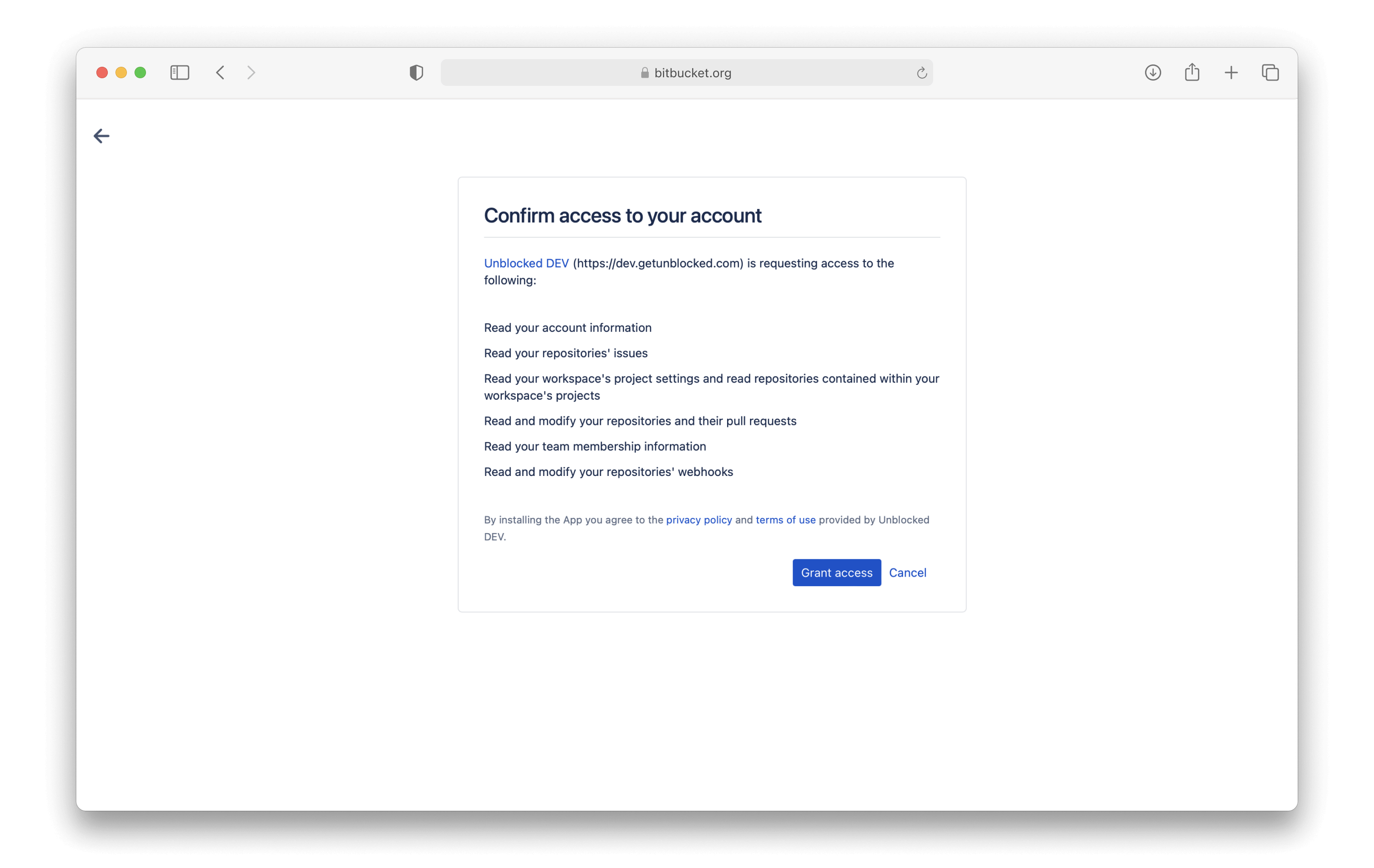
Once you're authenticated to Bitbucket, you'll be asked to grant access to Unblocked. This access will allow Unblocked to read the workspaces you are a part of as well as check for repositories in those workspaces, but it won't begin indexing those repositories yet.
 ### Connect your repositories
Once you've given access to your Bitbucket account, Unblocked still needs to know which repositories you want it to answer questions about. After granting access to your Bitbucket account, you'll be redirected back to Unblocked, where you'll be prompted to select the workspace you want to use with Unblocked.
### Connect your repositories
Once you've given access to your Bitbucket account, Unblocked still needs to know which repositories you want it to answer questions about. After granting access to your Bitbucket account, you'll be redirected back to Unblocked, where you'll be prompted to select the workspace you want to use with Unblocked.
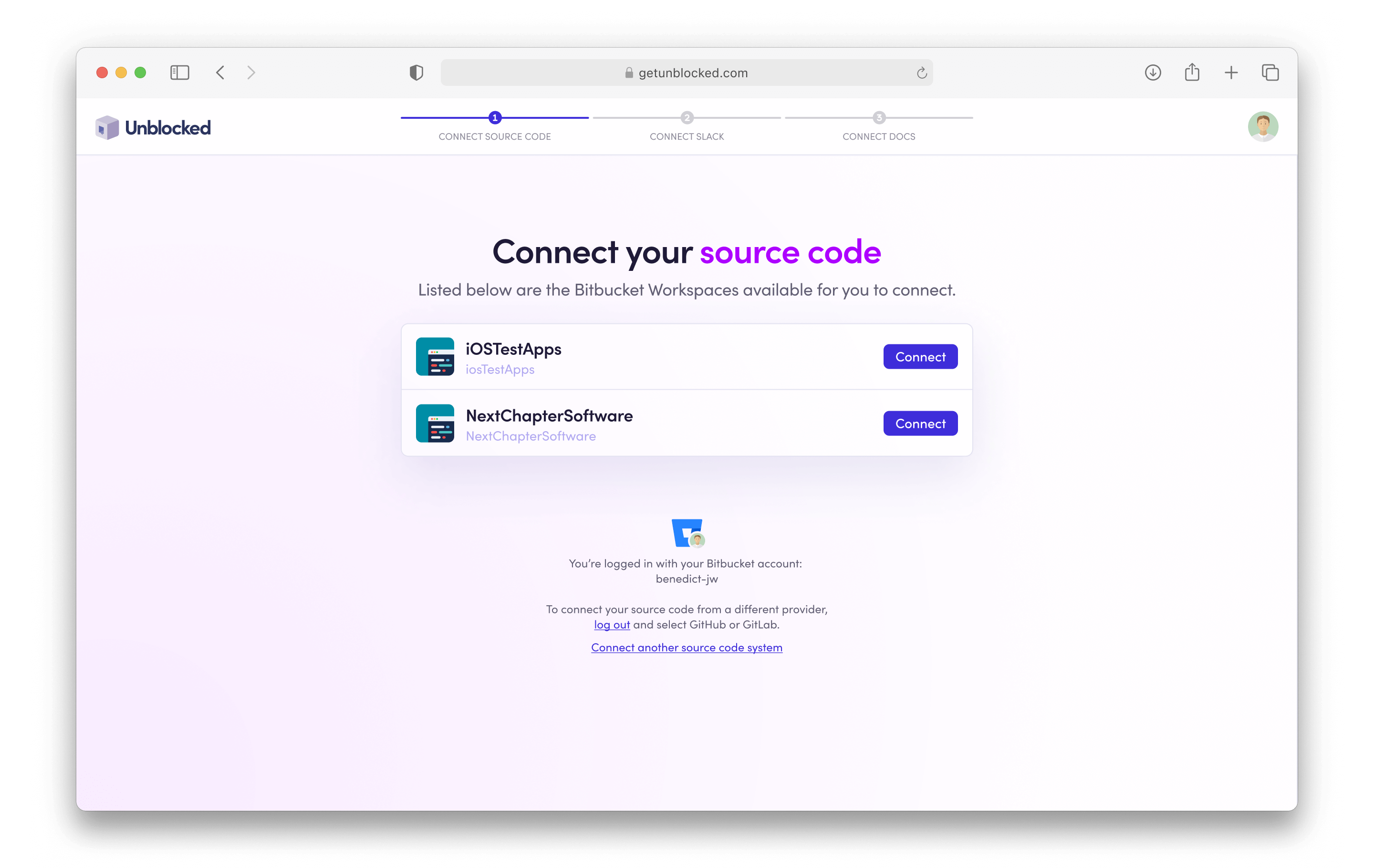 While you can install Unblocked in any Bitbucket workspace, Unblocked works best with your work organization and repositories.
Unblocked preselects the repositories that have been active in the last 6
months. Forked and archived repositories are not preselected.
## Generating a model for answering questions
Unblocked is able to answer questions for the repositories that it has ingested into its model. After giving Unblocked initial access to your workspace, you'll choose which repositories it should ingest. You can also select whether all new repositories should be automatically ingested into your Unblocked model.
While you can install Unblocked in any Bitbucket workspace, Unblocked works best with your work organization and repositories.
Unblocked preselects the repositories that have been active in the last 6
months. Forked and archived repositories are not preselected.
## Generating a model for answering questions
Unblocked is able to answer questions for the repositories that it has ingested into its model. After giving Unblocked initial access to your workspace, you'll choose which repositories it should ingest. You can also select whether all new repositories should be automatically ingested into your Unblocked model.
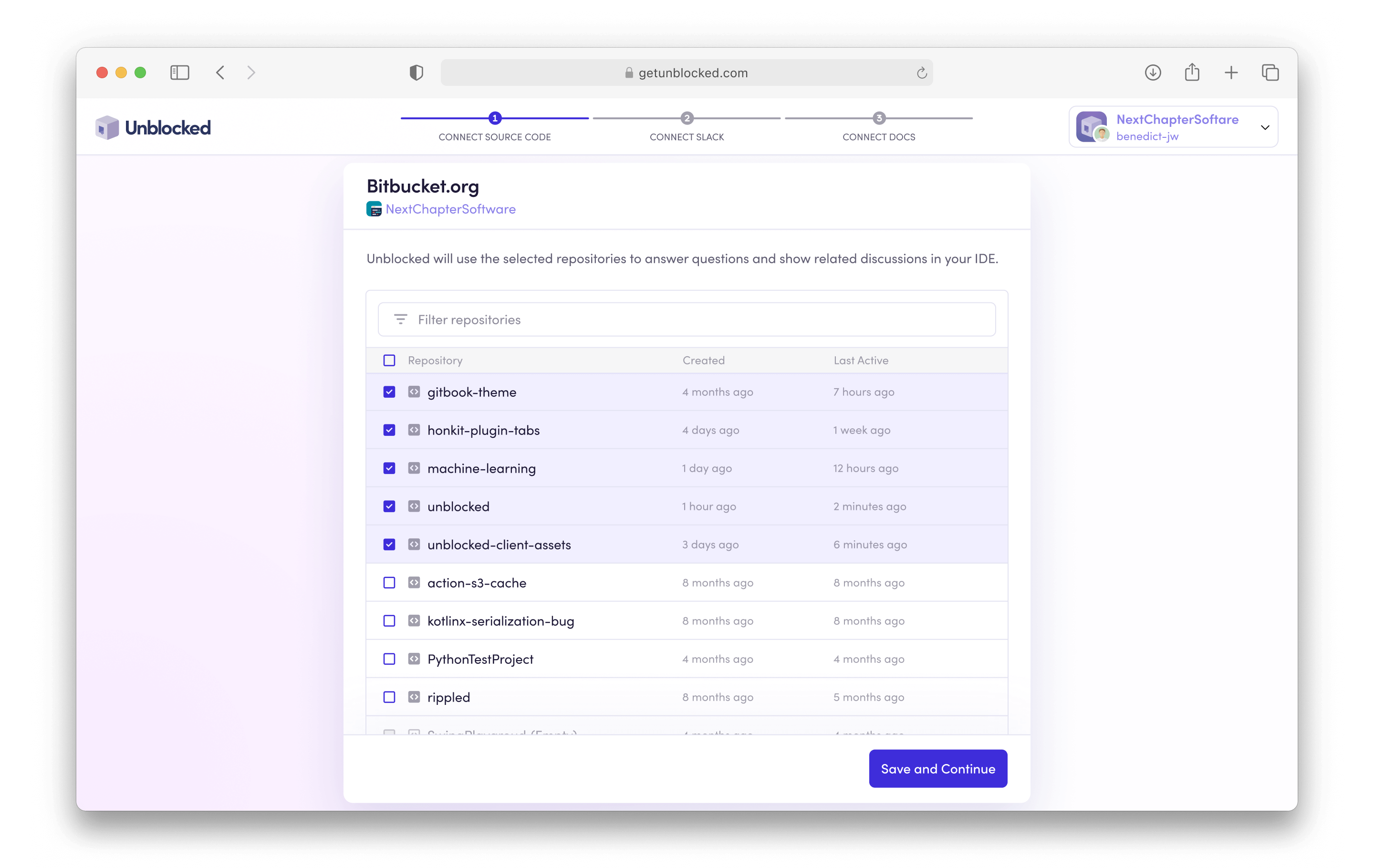 Once you select the repositories you want to ask questions about, click **Save and Continue**, and Unblocked will get to work.
If your repositories have a lot of code, documentation, and discussions, then data ingestion may take longer to process. However, Unblocked will keep you updated as it builds an understanding of your codebase and documentation.
## Managing repositories
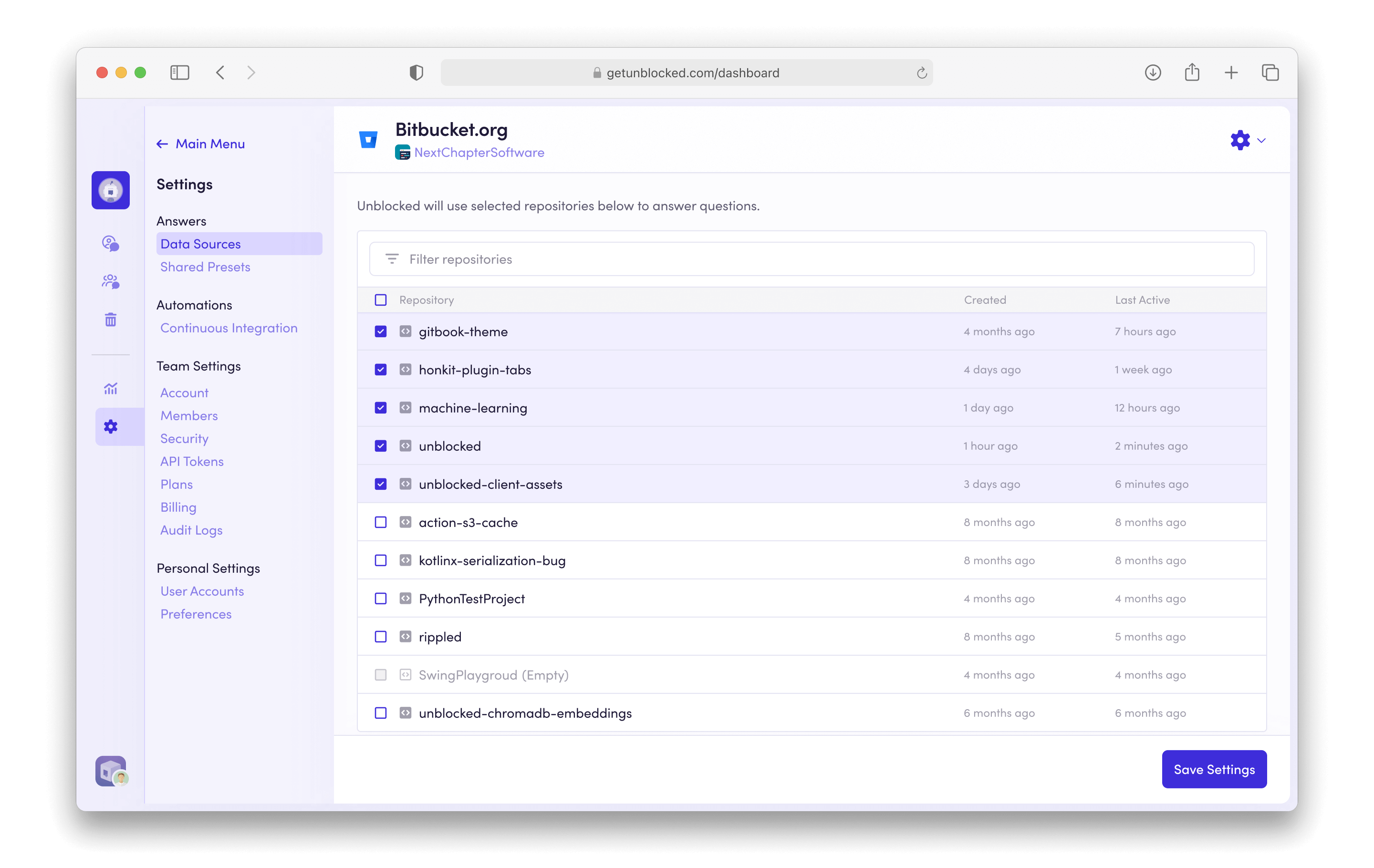
If you decide at a later time that you want to adjust the repositories that Unblocked can access, you can always add or remove connected sources. First, click **Settings** in the sidebar, then **Data Sources**. Next select the **Bitbucket**.
From here, you can add any repository that was not previously a part of Unblocked's data index, or remove any that you no longer want to include. Click **Save Settings**, and Unblocked will reindex your code so you can get answers only on the code from your selected repositories.
Once you select the repositories you want to ask questions about, click **Save and Continue**, and Unblocked will get to work.
If your repositories have a lot of code, documentation, and discussions, then data ingestion may take longer to process. However, Unblocked will keep you updated as it builds an understanding of your codebase and documentation.
## Managing repositories
If you decide at a later time that you want to adjust the repositories that Unblocked can access, you can always add or remove connected sources. First, click **Settings** in the sidebar, then **Data Sources**. Next select the **Bitbucket**.
From here, you can add any repository that was not previously a part of Unblocked's data index, or remove any that you no longer want to include. Click **Save Settings**, and Unblocked will reindex your code so you can get answers only on the code from your selected repositories.
 ## Continuing Set Up
While it is certainly possible to use Unblocked without incorporating any further [data sources](/configuring-data-sources), we strongly encourage you to include as many other systems in which you have documented or even discussed your applications. If you're using Unblocked’s Enterprise plan, you can also connect other source code management systems to your Unblocked workspace.
If you have restricted network access to your repositories, you may need to
[allow Unblocked's IP address ranges](/data-sources/ip-range).
## Continuing Set Up
While it is certainly possible to use Unblocked without incorporating any further [data sources](/configuring-data-sources), we strongly encourage you to include as many other systems in which you have documented or even discussed your applications. If you're using Unblocked’s Enterprise plan, you can also connect other source code management systems to your Unblocked workspace.
If you have restricted network access to your repositories, you may need to
[allow Unblocked's IP address ranges](/data-sources/ip-range).